Explore quick links
Quick links pages are lightweight, mobile-friendly sharing pages connected to LandingBio profiles. They work well for social bios, QR codes, messages, events, and simple sharing.
A simpler way to share where people should go
Your quick links page gives people a focused place to find your most important links, while your full LandingBio profile gives them more context when they want it.
For social bios
Use one clean link in places like Instagram, X, Bluesky, TikTok, or anywhere else you need a simple public link.
For conversations
Share your quick links after meetings, events, introductions, or messages when someone asks where they can find your work.
For more context
Connect people to your full LandingBio profile when they want your bio, posts, updates, and a clearer sense of what you are working on.
Lightweight when you need lightweight. Fuller when you need fuller.
LandingBio gives you both: a simple quick links page for easy sharing, and a fuller public profile for people who want to understand more about you, your work, and where to go next.
Create or edit your quick linksWhat a quick links page can include
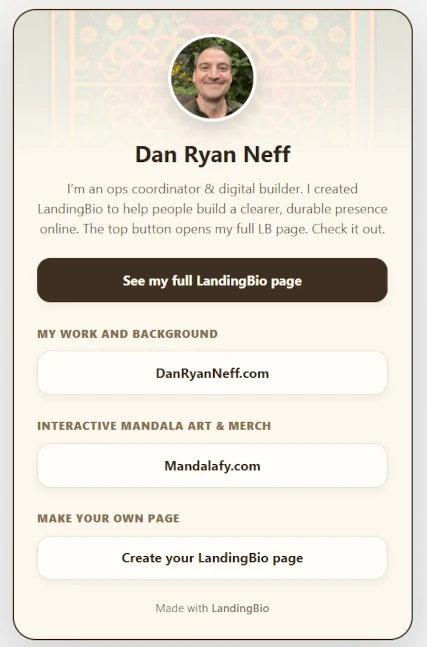
Each member can customize a simple card-style page that points visitors toward the places that matter most.
- A profile photo
- A short bio
- A banner style
- Important links
- A connection back to the full LandingBio profile
Example quick links page
Quick links pages are designed to be lightweight, visually clean, and easy to share across different platforms and situations.
Create your own quick links page
Your quick links page is included with your LandingBio profile. Use it when you want something simple, direct, and easy to share.